My Pleasure - Season 2: Advanced Walkthrough
About this game
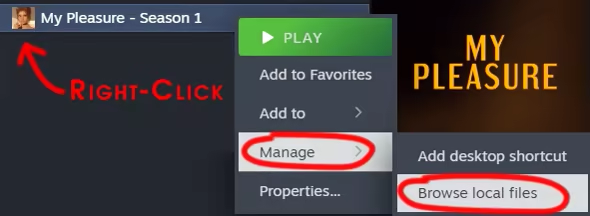
Once you have purchased this DLC, you can access it as follows:
1. Click "Manage my DLC" in the DLC block on the game page in the Steam client.
2. Check the "Install" box next to "My Pleasure - Season 2: Advanced Walkthrough"
3. The DLC will be downloaded to your games folder that you set up for Steam. The file is called "My_Pleasure_Advanced_WT_eng_S2.pdf"
Default path: "C:\Program Files (x86)\Steam\steamapps\common\My Pleasure - Season 1"

Advanced Walkthrough for My Pleasure - Season 2.